Showing posts with label Web. Show all posts

Monday, June 29, 2015

First Page Using PHP

Today We will see that how to write first PHP enabled Program and test that on Browser !
  • Basic Thing Before write a program in PHP.


  1. You required a Server like Apache or any other with PHP configuration.  
  2. You Should Create the PHP file in "DOCUMENT_ROOT"  for XAMPP (htdocs), for WAMP(WWW ), for IIS(WWW) and so for. Directory as PHP.ini are configured.
  3. Start to write a PHP Script
                File name: Hello.php 


  <html>  <head> <title> My First PHP Program! </title> </head><body><?php
                    /*PHP Script Start Here.*/ 
echo "Welcome to PHP!"; /* This statement print the Message Welcome to PHP! */?></body><html>
Then open start the service and then Open http://127.0.0.1/Hello.php or http://localhost/Hello.php 

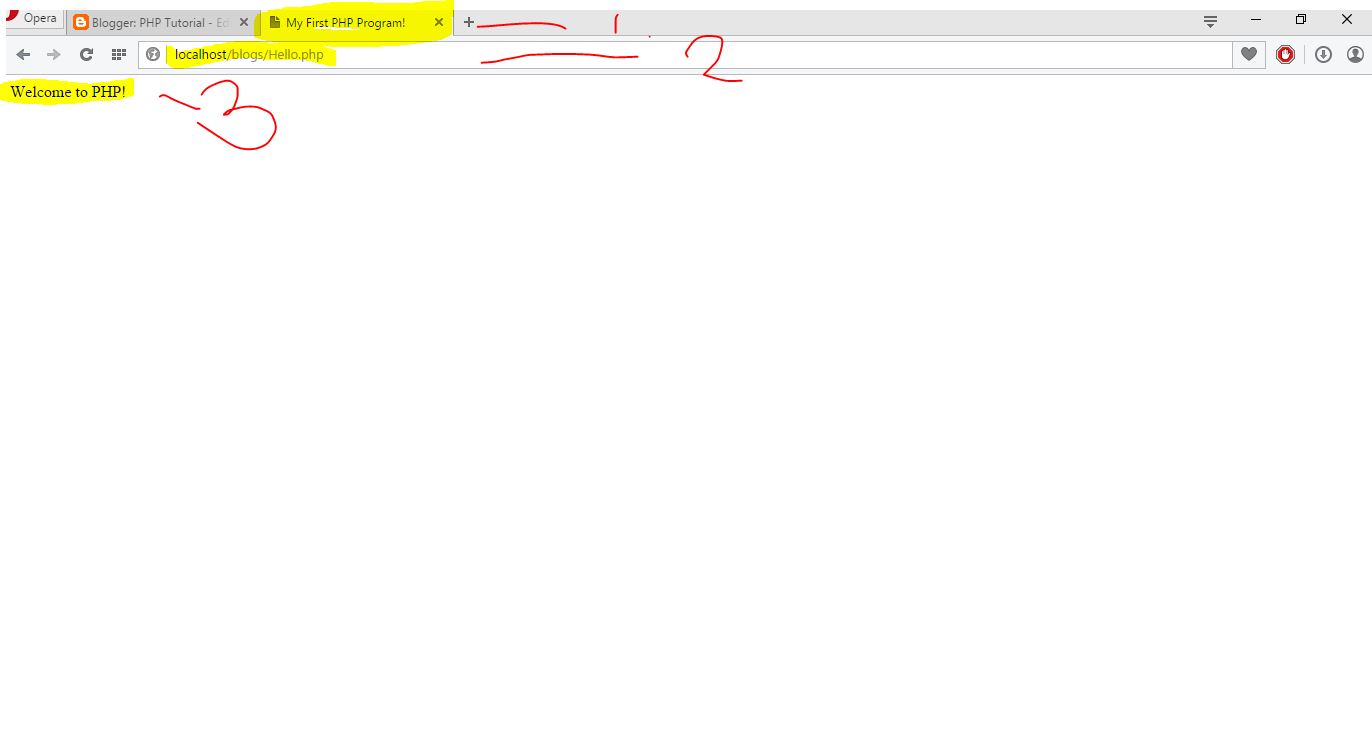
Output will Display like this..
Code in Editor.


Output on Browser.

In output in Browser Picture 1: Title of the Page
                                               2: Address in which your php is save (DOCUMENT_ROOT/blogs)
                                                3:Output of PHP Script!
If you try to see the source of the page in Browser the PHP Script look like test.

View Source Window in Opera.
              Highlighted Part the Main PHP Script <?php echo "Welcome to PHP!" ?>
             After Process by Apache Server the Script become "Welcome to PHP!".


  •          If output is display like below code that means your PHP Configuration in not Set     Correctly to do that and restart the server and then try. 


 <html>
 <head>
 <title>PHP Test</title>
 </head>
 <body>
 <p>Hello World</p>
 </body>
 </html>
Have a Good day and Happy Programming..

Saturday, June 27, 2015

Assignment 1 Question 3 (Server side and Client Side Scripting)

<?php
/**
* @author   :       Rajendra Kumar Yadav
* @filename :     a1q3.php
* @date     :         23:53:58 Sat 27- Jun - 2015 IST
* College Work: Assignment 1 Question 3
* College :           ATSS College PHP Practical
*/
 ?>
 <html Copyright (c) 2015 Copyright Rajendra Kumar Yadav All Rights Reserved. lang="en">
 <head> <title> Assignment 1 Question 3 </title> </head>
 <h3 class='test'> Assignment 1 Question 3 </h3>
 <hr align=center color=red size=2px>
 <body align=center bgcolor= antiquewhite>
   <style media="screen">
   .test {

      font-weight: normal;
      font-family: "Times new Roman";
      align-items: center;
      font-language-override: normal;
      color: inherit;
   }
   </style>
   <pre class="test">
     <form method="post" action="<?php $_PHP_SELF ?>">
       <label for="str1">Enter String 1 </label>      <input type="text" name="str1" required autofocus value="<?php if(isset($_POST['str1'])) echo $_POST['str1']; ?>"/><br/>
       <label for="str2">Enter String 2 </label>     <input type="text" name="str2" required autofocus value="<?php if(isset($_POST['str2'])) echo $_POST['str2']; ?>"/><br/>

       <h3 class='test'> --:Select Your Choice:-- </h3>
       <hr color=red size=0.5px align=center>
              Append Strings                  <input type="radio" value="append" name="ch"/>
  Size of length of String 1                  <input type="radio" value="string1len" name="ch"/>
        Reverse First String                  <input type="radio" value="stringrev" name="ch"/>
       <hr color=red size=0.5px align=center>
       <input type="submit" value="Check"/>     <input type="reset" value="Clear Areas"/>
     </form>
   </pre>
 </body>
 </html>

 <?php
if($_SERVER['REQUEST_METHOD']=='POST')
{

$str1=$_POST['str1']; // GOLABL VARIBALE FROM THE HTML PART.
$str2=$_POST['str2']; // GOLABL VARIBALE FROM THE HTML PART.
$ch=@$_POST['ch'];     // GOLABL VARIBALE FROM THE HTML PART.

if($ch=='append')
{
  echo "<hr align=center color=red> Concated String is:-"." $str1" . "$str2";
}
 if($ch=='string1len') {
  echo "<hr align=center color=red> String length is :-  ". strlen($str1);
}
if($ch=='stringrev') {
  $temp=strrev($str1);
  echo "<hr align=center color=red>First String Reverse & second as its is :- ". " $temp "." $str2";
}

}
?>

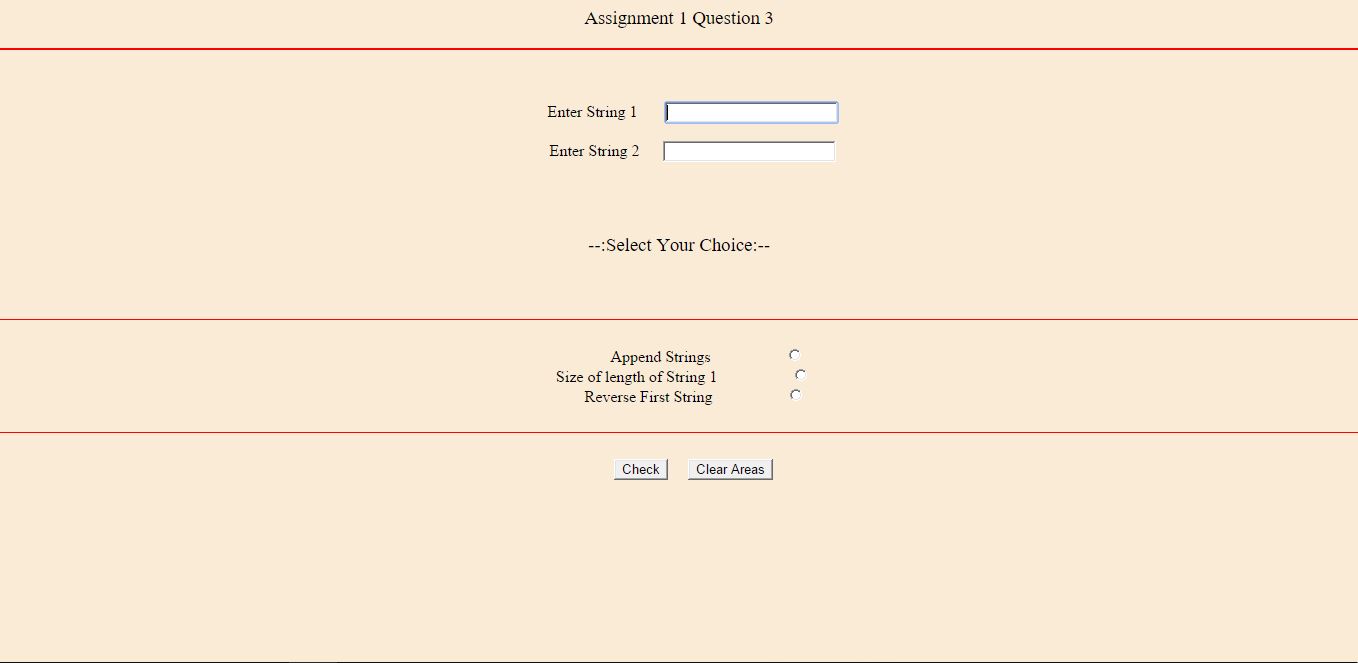
Images to Work on the page...


concate
Concatenation of Two String

emptyform
Main Form View


Reverse
Reverse First String and Print Overall String


strlen
Length of First String


Assignment 1 Question 2 (Server Side Scripting Part using PHP).

<?php
/*
@autor Rajendra Kumar Yadav
@Check the Substring position
@Check First and last occurance Position
@ Replace Small Substring with some new substring.
*/

$n=$_POST['str1'];
$n1=$_POST['str2'];
$n2=$_POST['str3'];
$ch=$_POST['ch'];
function POSITION($n,$n1)
{
$c=strpos($n,$n1);
$c1=strrpos($n,$n1);
echo "The Substring 2 Occurs at position ".$c." and ".$c1;
}
function OCCUR_SUBSTR($n,$n1)
{
$c2=substr_count($n,$n1);
echo "The Substring ".$n1 ." occured ".$c2." times.";
}

if($ch=="first_last_pos")
{
POSITION($n,$n1);
}
if($ch=="occ_substring")
{
OCCUR_SUBSTR($n,$n1);
}
function REPLACER($n,$n1,$n2)
{
$c3=strlen($n1);
$c4=substr_replace($n,$n2,$c,$c3);
echo "First String is ".$n;
echo "Second String is ".$n1;
echo "New String is ".$n2;

}
if($ch=="replacer")
{
REPLACER($n,$n1,$n2);
}

?>