Showing posts with label Computer Tricks. Show all posts

Saturday, June 27, 2015

Install PHP, MySQL, Apache and PHPMYADMIN..

Hello Friends,                              
             Before Write a PHP program it is necessary to configure the PHP with any Server like Apache or IIS or any other by using which it may possible to access the page.

      Today We will see that how to install PHP and Apache..
       
  •       There are two method to install the web server setup
  • First Method
    1.     Download the PHP Click Here.
    2.     Download Apache to Click Here.
Now Extract these .zip files and place in the C:/Apache and Configure Environment Variable.


  • Second Method
    1.  Download XAMPP (consist of Apache, MySQL, PHP, PHPMyAdmin). Click Here.
    2.  Download WAMP (Windows Apache, MySQL, PHP). Click Here
  • According to me XAMPP is best because it consist with all the required software setup for the web server designing and hosting.
  •  XAMPP and WAMP are .exe (executable file) it do all task automatically so not any configuration required after install directly after finish the installation, just start the service of Apache by clicking on Start.
xampp ctrl panel
Interface of XAMPP

 After start the service click here. or click here.

Hope so that you understand it if having any problem related to setup of XAMPP/WAMP or PHP and Apache to write the comment below in comment box.


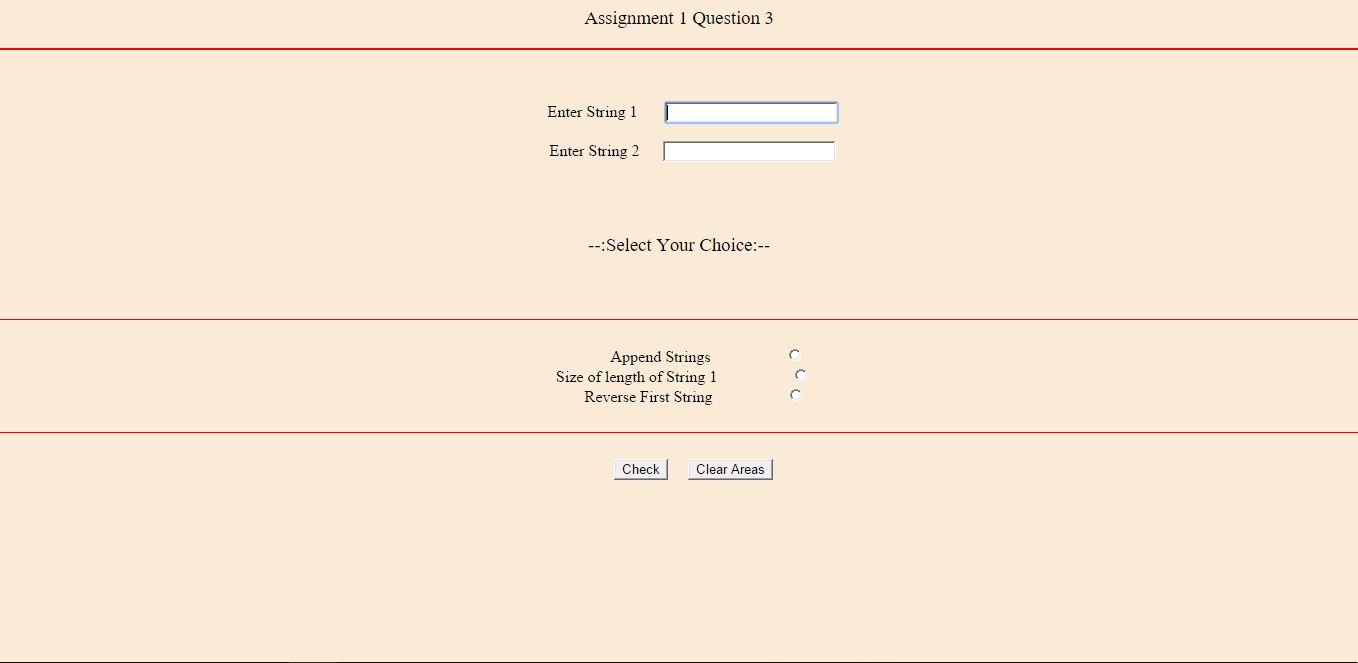
Assignment 1 Question 3 (Server side and Client Side Scripting)

<?php
/**
* @author   :       Rajendra Kumar Yadav
* @filename :     a1q3.php
* @date     :         23:53:58 Sat 27- Jun - 2015 IST
* College Work: Assignment 1 Question 3
* College :           ATSS College PHP Practical
*/
 ?>
 <html Copyright (c) 2015 Copyright Rajendra Kumar Yadav All Rights Reserved. lang="en">
 <head> <title> Assignment 1 Question 3 </title> </head>
 <h3 class='test'> Assignment 1 Question 3 </h3>
 <hr align=center color=red size=2px>
 <body align=center bgcolor= antiquewhite>
   <style media="screen">
   .test {

      font-weight: normal;
      font-family: "Times new Roman";
      align-items: center;
      font-language-override: normal;
      color: inherit;
   }
   </style>
   <pre class="test">
     <form method="post" action="<?php $_PHP_SELF ?>">
       <label for="str1">Enter String 1 </label>      <input type="text" name="str1" required autofocus value="<?php if(isset($_POST['str1'])) echo $_POST['str1']; ?>"/><br/>
       <label for="str2">Enter String 2 </label>     <input type="text" name="str2" required autofocus value="<?php if(isset($_POST['str2'])) echo $_POST['str2']; ?>"/><br/>

       <h3 class='test'> --:Select Your Choice:-- </h3>
       <hr color=red size=0.5px align=center>
              Append Strings                  <input type="radio" value="append" name="ch"/>
  Size of length of String 1                  <input type="radio" value="string1len" name="ch"/>
        Reverse First String                  <input type="radio" value="stringrev" name="ch"/>
       <hr color=red size=0.5px align=center>
       <input type="submit" value="Check"/>     <input type="reset" value="Clear Areas"/>
     </form>
   </pre>
 </body>
 </html>

 <?php
if($_SERVER['REQUEST_METHOD']=='POST')
{

$str1=$_POST['str1']; // GOLABL VARIBALE FROM THE HTML PART.
$str2=$_POST['str2']; // GOLABL VARIBALE FROM THE HTML PART.
$ch=@$_POST['ch'];     // GOLABL VARIBALE FROM THE HTML PART.

if($ch=='append')
{
  echo "<hr align=center color=red> Concated String is:-"." $str1" . "$str2";
}
 if($ch=='string1len') {
  echo "<hr align=center color=red> String length is :-  ". strlen($str1);
}
if($ch=='stringrev') {
  $temp=strrev($str1);
  echo "<hr align=center color=red>First String Reverse & second as its is :- ". " $temp "." $str2";
}

}
?>

Images to Work on the page...


concate
Concatenation of Two String

emptyform
Main Form View


Reverse
Reverse First String and Print Overall String


strlen
Length of First String